Showing posts with label MICROSOFT SURFACE. Show all posts

Thursday, 27 September 2012

The 10 most influential gadgets ever made


Many gadgets are me-too products, and that's no bad thing: technology is all about standing on the shoulders of giants, with firms taking and refining each others' ideas.
But which technologies were truly transformative, leaders rather than followers, blazing trails that the rest of the tech industry would soon follow?
The following ten-ish gadgets are our nominations, and our rules are simple: it has to be everyday tech, so for example computers and sat-nav devices count but hospital hardware and systems such as ABS definitely don't, and it must have had an enormous impact.
Think we've missed something? Let us know @TechRadar.

1. Sony Walkman - 1979

10 most influential gadgets ever
Imagine a world without Cliff Richard's Wired For Sound. That's what you'd have without the Walkman, which first appeared in 1979 and transformed the way we listened to, and thought about, music. With the Walkman, everyday reality was a movie, you were the star and your tapes were the soundtrack. It was mind-blowing then, and it's still pretty impressive today.

2. Diamond Rio PMP300 -1998

10 most influential gadgets ever
19 years after the Walkman, Diamond took Sony's ball and ran with it. The Rio wasn't the first mass-produced, solid-state digital music player - that was the SaeHan MPMan F-10 - but the 32MB Rio was the one that kickstarted the digital music revolution. If the heads of major record labels could travel back in time and kill something, the Rio would be top of their list.

3. Amazon Kindle - 2007

10 most influential gadgets ever
Is your gran reading Fifty Shades of Grey? Blame Amazon: the Kindle is the iPod of ebooks, and while the first generation was rather clunky the third generation cracked it and started not just an e-reading boom, but the self-publishing boom that's created superstars such as Fifty Shades filth-monger EL James.

4. IBM Personal Computer 5150 - 1981

10 most influential gadgets ever
Image credit: Bundesarchiv, B 145 Bild-F077869-0042 / Engelbert Reineke / CC-BY-SA
Compaq may deserve the credit for popularising it, but IBM invented it: the IBM Personal Computer, or PC for short, was widely cloned by obscure firms such as Dell, Compaq and HP, creating a de facto industry standard that enabled the personal computer boom of the 1980s and 1990s. Today's PCs look very different from IBM's original, of course, but everything from Ultrabooks to iMacs has the PC in its DNA.

5. Sony PlayStation 2 - 2000

10 most influential gadgets ever
Games consoles had been around for a long time, of course, but the PS2's blockbuster sales made gaming massive - and its inclusion of a DVD drive not only helped cement the then-youthful format's place in our front rooms, but also paved the way for today's consoles as hubs for all kinds of home entertainment.

6. Motorola DynaTAC 8000X - 1983

10 most influential gadgets ever
Image credit: Redrum0486, wikipedia, CC BY-SA 3.0
It looks hilarious now, but every time you update Facebook from your phone you owe a debt to the DynaTAC. The DynaTAC 8000X was the first commercially available portable cellular telephone, a phone you could carry around without being tied to a car or an enormously heavy briefcase. Instead of connecting to a single transmitter, the DynaTAC 8000X used a network consisting of "cells" spread over a wide area, hopping from cell to cell as you moved around.

7. Kodak Digital Camera - 1975

10 most influential gadgets ever
Image credit: Kodak
Steve Sasson, an electrical engineer who worked at Eastman Kodak, invented the digital camera in 1975. It used tape rather than solid state storage, its resolution maxed out at 10,000 pixels rather than today's multi-megapixel monsters, and it looked rather like a cassette recorder that had fallen on hard times, but it would prove revolutionary - and sadly, its descendants would ultimately kill Kodak's consumer business.

8. TiVo - 1999

Most influential gadgets
Image credit: Jared C Benedict, wikipedia, CC BY-SA 3.0
TiVo wasn't just about the hardware, although of course a digital video recorder is a handy thing to have. It was important for its software, too, which can recommend programmes it thinks you might like, find films starring your favourite actors or ensure you don't miss any episodes of Breaking Bad. Time-shifting and ad-skipping made it the networks' enemy and telly addicts' best friend.

9. Honda Electro Gyro-Cator - 1981

Most influential gadgets
Image credit: Honda
A shoo-in for the best product name of all time, the Electro Gyro-Cator was important for another reason: it was the first commercially available automated in-car navigation system. It used a gyroscope rather than GPS and transparent maps rather than computer-generated directions, and it was both enormously heavy and ridiculously expensive, but both sat-nav devices and apps can legitimately call the Gyro-Cator "granddad".

10. A whole bunch of Apple stuff - 1970s onwards

Most influential gadgets
Image credit: Danamania, wikipedia, CC BY-SA 3.0
We've lumped a whole bunch of influential Apple things together so that they don't take over the entire list. The iPhone stands out of course, but the PowerBook 100 changed laptop design by shoving the keyboard back and putting a pointing device in front of it, while the MacBook Air would, ahem, inspire PC makers 20 years on. The iPod changed music and the iPad tablets; the QuickTake brought digital cameras to the consumer market; the original iMac helped kill the floppy drive and influenced the design of everything from steam irons to sex toys... the Apple II... the Lisa... the Macintosh... the LaserWriter...
WINDOW SURFACE - A NEW GENERATION TABLET

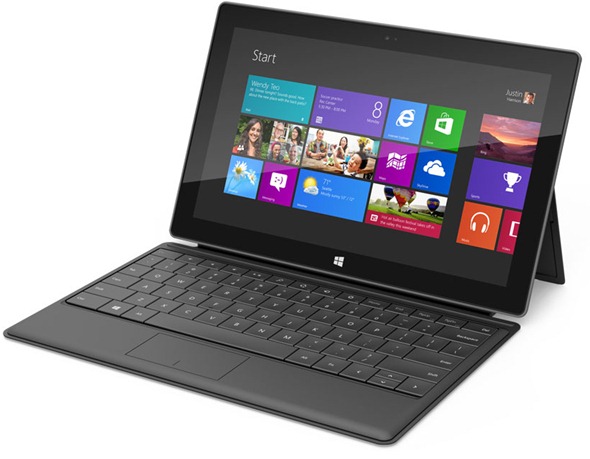
The super-thin keyboard cover and the satisfying-sounding hinge are all well and good, but what's the Surface tablet actually like to use?
At this stage Microsoft is being very cagey and no-one has had much time using Surface RT yet, but from our experience of trying it out, Microsoft has done exactly what it set out to do.
This is a Windows tablet designed first and foremost to run Windows – and especially the Metro Start screen and Metro-style apps with touch controls – and it does it very well.
Micrsoft Surface tablet

Surface Pro is an Intel Core i5 Ivy Bridge tablet; it's fast enough for demanding programs like Adobe Lightroom and the touchpad on the keyboard cover means you get the precision of a mouse for fiddly interfaces.
But Surface RT is an ARM tablet, running Microsoft's first version of Windows for RT and the company's first real tablet-friendly operating system.
The good news is that Windows RT feels just like Windows 8 – and it works well on a touchscreen.
The icons of the Start screen and the screens of apps like News scroll smoothly as you swipe across the screen (what Microsoft calls fast and fluid).
Microsoft Surface Tablet

Semantic zoom is equally fast and smooth; you can get through a lot of movies in the preview Netflix app to find the one you want and tap to start playing it full screen.
Snapping two applications side by side, so you can read Mail and enjoy photos or Web sites in the 4:3 aspect ratio looks great (apart from widescreen windows) and is also smooth and fast; drag an application from the side and drop it on the side of the screen where you want to see it.
Swiping up from the edge of the Surface tablet's bezel to see the app bar in Metro applications or swiping in from the side of the screen to get the Charm bar is fluid too - you don't have to swipe slowly the way you do on older touchscreen PCs.
Microsoft Surface tablet

Surface RT runs any Metro application, so that's anything in the Windows Store at this point, plus the Windows desktop – but only for desktop IE and the Office applications.
For working with the desktop, touch is fine for dragging windows around and scrolling through documents and Web pages, but if you're working in Excel or one of the other Office 2013 RT Home and Student programs included with Surface RT you'll probably want the touchpad (you probably want the keyboard anyway of course).

Microsoft Surface tablet - portrait mode

Turn Surface RT sideways and it flips the screen instantly and smoothly, although it's not too sensitive – so it doesn't flip back and forth if you angle the screen a little to show it someone.
Microsoft Surface tablet
There's no gratuitous animation as it rotates; you just get the same Start screen or app interface, only in portrait layout.
That works well for the Start screen, because the tiles just rearrange themselves into taller, narrower groups. And documents and Web pages all work well because you can see a full page on screen at once.
Perhaps the most remarkable thing about Surface RT and Windows RT is how unremarkable they feel.
This is Windows 8 and (some of) the Windows desktop.
If you're at all familiar with Windows 8, Surface RT feels like a nice, fast Windows 8 PC that just happens to have an ARM processor.
We need to try it with more apps and different peripherals to see how far that feeling goes, but so far, using Surface RT is using Windows 8 – with all its strengths and foibles.
Surface Pro has some extras above and beyond the Intel processor and the ability to run all your Windows programs.
The Ivy Bridge Core i5 still needs cooling, so there's a groove around the edge; it's 4mm thicker and 227g heavier and the screen resolution is what Microsoft cryptically calls ClearType Full HD.
It's got DisplayPort instead of HDMI and as well as the two keyboard covers it also comes with an active pen.
Microsoft Surface tablet review

This clips onto the side using the same magnets as the power cable, so it doesn't get in the way of the keyboard connections.
In your hands though, Surface Pro looks and feels very much the same – and the Touch Cover and Type Cover fit both interchangeably.

Early verdict

It's a surprise that Microsoft created its own tablet, but it's done a more than decent job of it; far more creative and polished than many Android tablets.
Microsoft has to get the price right – the current thinking is comparable withiPad and 10-inch Android tablets for Surface RT rather than with the 7-inch Kindle Fire – and battery life has to be good.
Surface doesn't feel like an iPad in your hands; it feels like a well-designed Windows tablet crammed with clever touches that make it practical.
But this is the first hurdle in a number to come in the tablet race – sure, the design and construction of the Microsoft Surface tablet is great and in a blind test would fare well against the best the tablet world has to offer.
The next stage is convincing the world that Windows 8 is a comparable tablet OS to iOS and Android, and making it competitive on cost too.
But the first move is a good one – giving choice, an excellent array of hardware and a well-designed tablet range to those that are still unsure whether the current crop of slates can match their needs.
It also sends a message to Microsoft's hardware partners: this is the standard for Windows 8 tablets should adhere to, unless you're going to get seriously competitive on price.
AMAZING INFO ABOUT WINDOW SURFACE


The Touch Cover is the ultra-thin touch keyboard for those that value portability; the Type Cover is the slightly thicker keyboard with physical buttons for those that want keys that actually move rather than just the audio feedback of the Touch Cover.
Both have the same connection and they snap into the magnetic latch easily but firmly; little latches fit into the Surface itself, which is why it stays in place even if you're holding the cover and letting the keyboard drop under its own weight.
Microsoft Surface tablet review

Snap either cover in place and instead of the sharp edge on one side, you have a comfortable grip that feels like the edge of a magazine or a thin hardback book – it's equally comfortable to hold whether the cover is closed to protect a screen that doesn't really need protection or folded back.
As soon as you fold the cover forward against the screen it turns the Surface off (putting it into Connected Standby – we're wondering if Apple's patent lawyers are rubbing their hands with glee at more work); when you fold it back against the hinge the accelerometer turns the keyboard off automatically so you're not typing while you hold it.
Microsoft Surface tablet review

That's the same feature as on Lenovo's Yoga notebook, but with a much thinner keyboard to fold back.
The Touch Cover looks more like a picture of a keyboard than an actual keyboard; it's the same multitouch sensors Microsoft used inside theSidewinder keyboard.
They're very thin but they're also very accurate so they pick up your typing well. The keys are a good size with a little spacing between them; the touchpad underneath is a little small but it has left and right buttons – and you have the whole touch screen for larger gestures.
Microsoft Surface tablet review

You'll use the touchpad when you want the precision of placing the mouse cursor inside a word.
The Touch Cover comes in five colours: white, black, red plus cyan and magenta versions that will match Nokia's cyan and magenta Lumia rangenicely.
Typing on the Touch Cover is a little odd at first because the keys don't move under your fingers; but they don't pick up typing until you actually hit the keys so just resting your hand on the keyboard or even putting your fingers in place on the keyboard while you think about what to say doesn't generate stray characters.
Microsoft Surface tablet review

The soft surface is more comfortable and less slippery than typing on a screen – not to mention being at the right angle.
It is harder on your fingers than typing on a keyboard with physical keys that give as you type, so if you type a lot there's the Type Cover.
This has the same strokeable soft feel as the Surface chassis itself and the keys go down a surprising distance for a keyboard that's still so thin.
Microsoft Surface tablet review

As well as all the usual keys, down to backslash, pipe and a nicely arranged set of four arrow keys, the top row of keys has the volume, media playback and navigation keys you'd expect – and that's Home, End, Page Up, Page Down and Delete but not the irritating Insert key that does nothing but make Word type over what you've already written.
Between them are four keys you won't have seen before but will recognise from the Windows 8 interface; they're the Search, Share, Devices and Settings buttons from the Charm bar so you can get at them without having to take your hands of the keyboard to swipe across the screen.
The Type Cover has those keys labelled as function keys as well; the Function lock button is on the Touch Cover as well so you can use F7 in Word to start spell check of Shift F3 to change case if you want to.
Presumably, Microsoft believes that if you know what function keys are you can find them by the number keys in the row below.
Microsoft Surface tablet review

The back of the keyboard covers (and the front of the Touch Cover) are a tough microfibre fleece made especially for Microsoft; it's soft to the touch, comfortable and gives you a good grip.
MICROSOFT SURFACE REVIEW

Hands on: Microsoft Surface tablet review

Our first look at the new player in the tablet race


Update: We've spent some time updating our experience with the Microsoft Surface tablet's interface - including detailing that elusive portrait mode.
Magnesium chassis, vapour deposition coating, cutaway edges, ClearType HD display; the design credentials and the specs for Microsoft's new Windows RT tablet are impressive and in the flesh this is a delightful piece of hardware that looks good – and is practical too.
It's thin, it's light, it's comfortable to hold, it runs Windows RT as excellently as you'd expect, it makes you want to touch it but it's also designed so you can snap the magnetically attached cover into place – in no way similar to any competitor idea...


However, you won't be able to get the Surface tablet until Windows 8 ships – and we can't get its big brother, the Intel Core i5 Surface for Windows 8 Pro, for another three months after that.

Design

The design of the Surface for Windows RT (and the similar Surface for Windows 8 Pro that we didn't see in as much detail) is understated.
Microsoft Surface tablet review

The front is sleek black glass, precision bonded to the magnesium alloy chassis ("we squeezed all the air out," as Microsoft hardware expert Stevie Battiche told TechRadar), with only a Windows logo visible – the word Microsoft doesn't show up on the case anywhere.
Turn it on and the 10.6" screen fills most of the Surface's front display, but the four edges have half an inch of bezel so you can hold it comfortably.
Microsoft Surface tablet review

The Windows logo isn't just for show; it's a touch button that gives you the Start screen when you tap on it, plus the whole bezel is touch-aware so you can swipe across it to bring up the App bar or the switching pane (depending on which way round it is).
Microsoft Surface tablet review

The Surface is light and comfortable to hold; the edges are sloped to give you a comfortable grip (although the edge with the cover connector isn't quite as ergonomic until you connect the cover).
The magnesium alloy chassis is covered with a soft coating that feels durable and expensive (that's the vapour deposition bit; it's chemically bonded rather than just painted on).
Microsoft Surface tablet review

If you don't want to hold it, there's a built-in stand that's like a large hinge running across the entire back of the Surface, with another Windows logo in a slightly matte finish.
The hinge is usually held in place by an array of magnets so it doesn't fall out if you shake the Surface around; on the left there's a little cutout in the edge of the hinge to make it easier to flip out.
Microsoft Surface tablet review

If you've seen Apple's SmartCover on the new iPad 3, then this method of connection won't be a surprise – it's another move that shows Microsoft is intending to go toe-to-toe with the Cupertino brand in the tablet arena.
The Surface tablet also balances well on the hinge, which has two long rubber feet to stabilise it.
With the Touch Cover on, we were able to balance the Surface on a lap for typing like a notebook without it falling forward or tipping over backwards; compare this to the Asus Transformer Prime which always wants to fall backwards, and you'll appreciate this weighting.
Microsoft Surface tablet review

Microsoft has included the fewest ports it could get away with; the bottom edge is filled with the magnetic keyboard connector, the top has the power button and the sides have two speakers, dual microphones, microSD, one USB 2.0 port (USB 3.0 for the Surface Pro) and Micro HDMI (on the surface Pro that's mini DisplayPort), plus a magnetic power connector.
Microsoft Surface tablet review

The magnesium alloy chassis and the precision design give the Surface RT a sturdy feel. Lift it by the corners and twist and there's no flexing at all; we tried the same thing with the frame of a chassis that hadn't been assembled and even without the glass and back it barely moved.
The Microsoft team showing off the tablets weren't cradling them protectively; at one point Battiche tossed a tablet to a colleague. Even without the cover, the Surface should stand up to some punishment.


READ NEXT POSTS FOR FURTHER INFO